I set out to understand the full path of keyboard input while hardening my workstation and researching methods to add keylogging capabilities to Glimmer.
I found that the newer Wayland accessibility KeyboardMonitor path can expose raw compositor keyboard events to an unprivileged process that claims a specific D-Bus session bus name: org.gnome.Orca.KeyboardMonitor.
I confirmed this behavior on both KDE Plasma/KWin and GNOME Shell/Mutter. In both cases, no root access, input group membership, /dev/input access, capabilities, or accessibility setting changes were required.
This is not a Wayland protocol vulnerability. Wayland’s normal client input isolation is working: ordinary unfocused clients do not receive global keyboard events. The issue is that KWin and Mutter expose a compositor-side accessibility keyboard monitor over D-Bus, and the current authorization model treats ownership of a claimable D-Bus name as proof that the caller is Orca.
This is separate from traditional AT-SPI2 accessibility event monitoring. AT-SPI2 can provide significantly more contextual data, including window titles, focus changes, and form-field information, but it requires changing accessibility settings and password fields are masked. KeyboardMonitor provides less context, but returns raw key events, including input typed into password fields.
Confirmed Test Environments
| Environment | Compositor | Session | Result |
|---|---|---|---|
| Fedora 44 KDE Plasma | KWin 6.6.4-2 | Wayland | Confirmed |
| Ubuntu 26.04 LTS GNOME | Mutter 50.1-0ubuntu2 | Wayland | Confirmed |
Both tests used an unprivileged user session on default install settings. No root, no input group, no /dev/input access, no capabilities, and no accessibility setting changes were required.
Input Isolation on Wayland
One of the key security improvements in Wayland over X11 is input isolation. On X11, any client could often observe input intended for other clients through mechanisms like XTEST, XRecord, or other X11 APIs. On Wayland, input routing is controlled by the compositor. Ordinary clients receive keyboard events only when the compositor decides they should.
That isolation still works in the normal client path. In my testing, unfocused applications did not receive keyboard input through ordinary Wayland client mechanisms.
The finding in this post is different: the raw keyboard events are exposed through a compositor-provided accessibility interface, org.freedesktop.a11y.KeyboardMonitor, over the session D-Bus. The compositor is still the component receiving and routing input correctly - the problem is the authorization check around this accessibility monitoring path.
Unprivileged Keylogging via D-Bus
Screen readers need keyboard access, that is one of their core functions. I explored two methods through D-Bus to get access to that information.
KeyboardMonitor Interface
org.freedesktop.a11y.KeyboardMonitor is a compositor-provided accessibility interface exposed on the session D-Bus at /org/freedesktop/a11y/Manager.
I confirmed this interface on both KWin and GNOME Shell/Mutter. The interface exists so screen readers can receive keyboard events under Wayland, where ordinary clients are no longer allowed to observe global input the way they could under X11.
The interface exposes several methods:
WatchKeyboard- Request notification of keyboard eventsGrabKeyboard- Request exclusive use of the keyboard, events are sent to the caller instead of other clientsSetKeyGrabs- Request notification when specific key combinations are pressedUngrabKeyboard- Cancel an exclusive keyboard grabUnwatchKeyboard- Cancel keyboard event monitoring
Each method is interesting, but for this post I focused on WatchKeyboard. When active, it emits KeyEvent signals containing raw keyboard event data such as pressed/released state, keysym, charcode, and scancode.
Calling the WatchKeyboard method returned: “Only screen readers are allowed to use this interface”:
k@devbox:~$ busctl --user call org.freedesktop.a11y.Manager /org/freedesktop/a11y/Manager org.freedesktop.a11y.KeyboardMonitor WatchKeyboard
Call failed: Access denied
On KDE/KWin, I noticed this series of events on the bus:
‣ Type=method_call
  Destination=org.freedesktop.a11y.Manager
  Path=/org/freedesktop/a11y/Manager
  Interface=org.freedesktop.a11y.KeyboardMonitor
  Member=WatchKeyboard
  MESSAGE "" { };

‣ Type=method_call
  Destination=org.freedesktop.DBus
  Path=/org/freedesktop/DBus
  Interface=org.freedesktop.DBus
  Member=GetNameOwner
  MESSAGE "s" { STRING "org.gnome.Orca.KeyboardMonitor"; };

‣ Type=error
  Sender=org.freedesktop.DBus
  ErrorName=org.freedesktop.DBus.Error.NameHasNoOwner
  ErrorMessage="The name does not have an owner"
  MESSAGE "s" { STRING "The name does not have an owner"; };

‣ Type=error
  ErrorName=org.freedesktop.DBus.Error.AccessDenied
  ErrorMessage="Only screen readers are allowed to use this interface"
  MESSAGE "s" { STRING "Only screen readers are allowed to use this interface"; };
I went looking through the code for the Orca mention. In KDE KWin, this was introduced in May 2025 in KDE KWin 6.3.90. This is acknowledged in the merge discussion.
KWin performs the check directly in A11yKeyboardMonitor::checkPermission().
bool A11yKeyboardMonitor::checkPermission()
{
    QDBusMessage msg = QDBusMessage::createMethodCall(QStringLiteral("org.freedesktop.DBus"), QStringLiteral("/org/freedesktop/DBus"), QStringLiteral("org.freedesktop.DBus"), "GetNameOwner");
    msg.setArguments({QStringLiteral("org.gnome.Orca.KeyboardMonitor")});
    QDBusReply<QString> orcaName = QDBusConnection::sessionBus().call(msg);

    if (message().service() != orcaName) {
        sendErrorReply(QDBusError::AccessDenied, "Only screen readers are allowed to use this interface");
        return false;
    }

    return true;
}
GNOME/Mutter uses a different implementation, but the same security property. This was introduced in February 2025 in GNOME/Mutter 48.0. The sensitivity and challenges are acknowledged in the merge discussion. Its accessibility manager authorizes calls through an access-checker and allows the sender associated with org.gnome.Orca.KeyboardMonitor:
// meta-a11y-manager.c
  g_signal_connect (manager->keyboard_monitor_skeleton, "g-authorize-method",
                    G_CALLBACK (check_access), manager);

  g_signal_connect (manager->keyboard_monitor_skeleton, "handle-watch-keyboard",
                    G_CALLBACK (handle_watch_keyboard), manager);

  meta_dbus_access_checker_allow_sender (manager->access_checker,
                                         "org.gnome.Orca.KeyboardMonitor");
}
The access checker then resolves the allowed well-known name to its current unique D-Bus owner and compares that owner against the caller:
// meta-dbus-access-checker.c
if (sender_name &&
    g_strcmp0 (allowed_sender->name_owner, sender_name) == 0)
  return TRUE;
The intent is clear that only Orca, the screen reader, should be able to access raw keyboard monitoring. The problem is the authorization signal. Both confirmed implementations ultimately trust ownership of org.gnome.Orca.KeyboardMonitor, and a D-Bus well-known name can be claimed by any session process when it is not already owned.
First, confirm the Orca name is claimable:
k@devbox:~$ dbus-test-tool black-hole --session --name=org.gnome.Orca.KeyboardMonitor

(second terminal)
k@devbox:~$ busctl --user status org.gnome.Orca.KeyboardMonitor | grep ^CommandLine
CommandLine=dbus-test-tool black-hole --session --name=org.gnome.Orca.KeyboardMonitor
This only proves that the name is claimable. The process calling WatchKeyboard must own the name on the same D-Bus connection, so the PoC performs both actions in one process: request org.gnome.Orca.KeyboardMonitor, then call WatchKeyboard.
Using a small Python script to claim the name and call the WatchKeyboard method again we now receive KeyEvent signals from every keystroke the compositor receives:
k@devbox:~$ python3 a11y-keyboardmonitor-poc.py
[*] RequestName result: (uint32 1,)
[+] WatchKeyboard succeeded!
[*] Listening for keystrokes...
yep, it works[CTRL]c^C
[*] Cleaning up
Keyboard Input Path
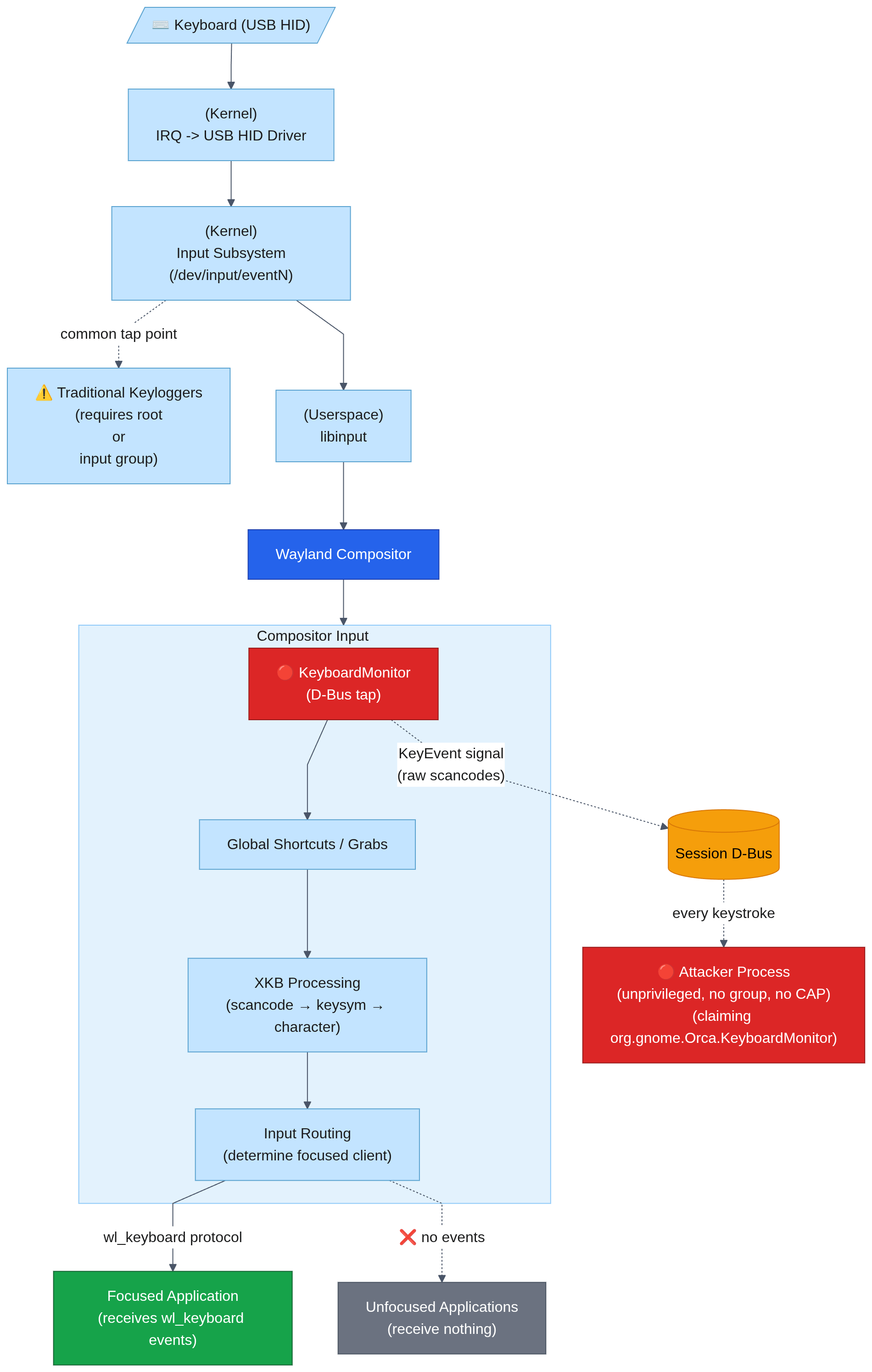
This is what the keyboard input path looks like from my research. Ordinary Wayland clients still only receive routed input, while the accessibility monitor receives compositor-side key events:
Related Accessibility Events
The primary accessibility path for keyboard monitoring is AT-SPI2, which operates on a separate accessibility bus. Enabling it requires a dconf write to toolkit-accessibility, which signals every application on the session bus to connect to the a11y bus - a noisy event that generates logs and causes some applications to misbehave. Password fields are properly masked. The KeyboardMonitor method requires none of this: a single bus name claim on the session bus, no configuration change, no side effects, and raw keystrokes including passwords.
| AT-SPI2 | KeyboardMonitor | |
|---|---|---|
| Setup required | dconf write (detectable) | RequestName (ephemeral) |
| Side effects | config change, apps notified, observable | None |
| Passwords | Masked (•••) | Raw cleartext |
| Context | Window titles, field names, focus | Raw keycodes only |
| Bus | Separate a11y bus | Session bus |
PoC
This technique has been incorporated into glimmer. There is a standalone ‘dump_keypress.rs’ binary that can be compiled and run to test your systems.
Note: this captures keystrokes from all windows, all applications, including password fields. The other approaches I tested like AT-SPI2 provided a lot more context (focused window name, focused field name, etc), but this was the only approach that captured full raw keypresses.
This works as any unprivileged user in the session, you do not need root or any special capabilities.
AT-SPI2 and KeyboardMonitor are not exclusive. By capturing both, an attacker can make more intelligent decisions regarding what is noise vs what to capture based on window title, form field name, etc and can include that contextual data with the logs.
More PoCs for Flatpak, bubblewrap and Eclipse IDE plugin are in other sections.
Impact
Any process running as the session user can capture all keyboard input. No kernel module needed, no ptrace, no LD_PRELOAD, no capabilities, no group membership, no /dev/input access.
Only D-Bus calls to the compositor are required which limits detection opportunities.
This is significant for several scenarios:
- Malicious application, IDE plugin, native helpers
- Trojanized package or script
- Post-compromise credential harvesting
- Sandbox/containers that provide access to the session bus for a11y
This post focuses on WatchKeyboard, because passive raw key capture was the goal. The same interface also exposes GrabKeyboard and SetKeyGrabs, which affect keyboard input delivery and shortcut handling. I am not treating those as input injection here.
Host Input Capture from Sandboxed Apps
This is not a kernel or namespace escape. It is a host input-capture path exposed through a granted session-bus permission. This captures keyboard events from the host system. A sandbox/container that provides access to the session bus can use this to capture keyboard events from the host system.
Flatpak
A Flatpak app granted sockets=session-bus is able to access the raw KeyboardMonitor data from the host outside of the container. First, to confirm it works from within the container, using GNOME Calculator as a simple test application, I start it normally and it cannot reach the required host D-Bus service:
k@devbox:~$ flatpak run --command=bash org.gnome.Calculator
[📦 org.gnome.Calculator ~]$ python3 a11y-keyboardmonitor-poc.py
gi.repository.GLib.GError: g-dbus-error-quark: GDBus.Error:org.freedesktop.DBus.Error.ServiceUnknown: org.freedesktop.DBus.Error.ServiceUnknown (2)
Now explicitly adding --socket=session-bus:
k@devbox:~$ flatpak run --command=bash --socket=session-bus org.gnome.Calculator
[📦 org.gnome.Calculator ~]$ python a11y-keyboardmonitor-poc.py
[*] RequestName result: (uint32 1,)
[+] WatchKeyboard succeeded!
[*] Listening for keystrokes...
yep still works[CTRL]c^C
[*] Cleaning up
That logged keystrokes from a different window in my desktop environment, entirely separate from the calculator Flatpak container.
I did a quick scan of flathub to see what Flatpak apps have these permissions and the interesting ones are:
- com.jetbrains.PyCharm-Professional
- com.jetbrains.Rider
- org.codeblocks.codeblocks
- org.eclipse.Java
- org.gnome.Builder
The other Flatpak apps with sockets=session-bus permissions are org.xfce.ristretto, io.qt.qdbusviewer, org.fcitx.Fcitx5, org.freedesktop.Bustle, org.gnome.dspy, org.syntalos.syntalos, page.codeberg.JakobDev.jdDBusDebugger.
A malicious plugin in an application with session-bus access may be able to keylog outside of its container, through a channel that is not frequently monitored.
I was curious to test this so I put together a simple plugin for Eclipse that writes and executes a Python script at startup that handles the D-Bus interaction. I don’t know (or want to know) Java or Python, and I also don’t use Eclipse, so this PoC is intentionally minimal. The goal was not to build a polished plugin, only to verify whether code running inside the Flatpak could reach the host KeyboardMonitor path and capture keystrokes from unrelated host windows.
The source for the Eclipse PoC is on GitHub.
After building the jar, I start eclipse:
flatpak run org.eclipse.Java -consoleLog -console
Install the plugin to Eclipse from within the console:
g! install file:/tmp/com.linnemanlabs.themehelper_1.0.0.jar
Bundle ID: 530

g! start 530

g! hope we arent being keylogged
gogo: CommandNotFoundException: Command not found: hope
That might be my new favorite error message. Checking our keylog file inside the Flatpak container:
[📦 org.eclipse.Java eclipse2]$ cat /tmp/.theme_cache.dat
hope we arent being keylogged oh no we are
The second “oh no we are” was typed into a separate window in my desktop environment.
bubblewrap
Bubblewrap is a sandboxing tool that Flatpak and pressure-vessel use. When configuring the bubblewrap environment, if the D-Bus socket is bound then full keylogging of the host environment is available over D-Bus from the sandboxed environment.
The D-Bus socket sits inside $XDG_RUNTIME_DIR, so by binding the runtime directory, the session D-Bus socket is available directly. Any sandbox that binds this directory for basic desktop functionality (display, audio, integration) implicitly grants D-Bus access. Selective binding of individual sockets is possible but requires intentional effort.
k@devbox:~$ bwrap \
  --ro-bind /usr /usr \
  --ro-bind /lib64 /lib64 \
  --bind /tmp /tmp \
  --bind "$XDG_RUNTIME_DIR" "$XDG_RUNTIME_DIR" \
  -- python3 /tmp/a11y-keyboardmonitor-poc.py

[*] RequestName result: (uint32 1,)
[+] WatchKeyboard succeeded!
[*] Listening for keystrokes...
yep it works[CTRL]c^C
[*] Cleaning up
This will have added significance in certain environments.
Affected Scope
The confirmed behavior exists on both KWin and GNOME Shell/Mutter in my testing. The shared element is the newer Wayland accessibility org.freedesktop.a11y.KeyboardMonitor path used for Orca keyboard monitoring.
KDE/KWin:
- KWin v6.3.90+ / Plasma 6.4+ when
org.freedesktop.a11y.KeyboardMonitoris exposed and authorized throughorg.gnome.Orca.KeyboardMonitor - Commonly shipped by current KDE Plasma environments in Fedora KDE, Arch Linux KDE, openSUSE Tumbleweed KDE, KDE neon, Manjaro KDE, and SteamOS 3.8 Beta / Preview Desktop Mode
GNOME/Mutter:
- GNOME/Mutter 48.0+ when
org.freedesktop.a11y.KeyboardMonitoris exposed and authorized throughorg.gnome.Orca.KeyboardMonitor - Commonly shipped by current GNOME environments in Fedora Workstation, Ubuntu GNOME, Debian 13/Trixie GNOME, Arch Linux GNOME, and openSUSE Tumbleweed GNOME
These are version-based likely-affected entries, not exhaustive testing. I personally confirmed this on:
- Fedora 44 KDE Plasma / KWin 6.6.4-2
- Ubuntu 26.04 LTS GNOME / Mutter 50.1-0ubuntu2
Fix Direction
This touches a lot of areas. The exact fix belongs with the compositor, accessibility, and desktop-permission maintainers. This crosses KWin, Mutter, AT-SPI2, Orca and other screen readers, sandboxing, portals, and desktop authorization models, so I am not prescribing a specific implementation.
The security property seems clearer than the implementation: raw compositor keyboard monitoring should not be authorized only by ownership of a D-Bus well-known name that any session process can claim.
A D-Bus well-known name is useful for routing messages. It is much weaker as proof of application identity. In this case, the name gates access to raw keyboard events from the compositor.
Detection
KeyboardMonitor
Detection opportunities for this technique are challenging because the meaningful signal is at the D-Bus message layer. Traditional host telemetry may show process activity, socket writes, interpreter behavior, or plugin loading, but it usually will not decode the event showing a process claiming org.gnome.Orca.KeyboardMonitor and calling WatchKeyboard.
The most reliable detection is monitoring the D-Bus session bus itself for RequestName calls claiming org.gnome.Orca.KeyboardMonitor from processes that aren’t /usr/bin/orca, or any calls to WatchKeyboard or GrabKeyboard on the KeyboardMonitor interface if you don’t use assistive technologies.
D-Bus security monitoring is an underserved area - most environments have no visibility into session bus traffic.
AT-SPI2
The dconf setting toolkit-accessibility=true is relevant to many AT-SPI2 paths. On my systems it was false by default, and enabling it caused visible bus and application activity as accessibility-aware applications reacted to the setting change.
I am not covering that deeply here. It is a related detection surface for AT-SPI2-style monitoring, not required for the KeyboardMonitor path.
Secondary signals
- Monitor
toolkit-accessibilitydconf setting change. False by default, on my system, this needs to be flipped true for most of theAT-SPI2paths. - When
toolkit-accessibilityis enabled many a11y-enabled apps connect to the a11y bus, normally they do not - On most systems without a screen reader, the Orca bus name should never be claimed, any claim is suspicious
Future Detection Work
I am exploring D-Bus-aware monitoring but I am early in that process still. The useful signal here is not “a process wrote to a Unix socket,” but the D-Bus operation and metadata: RequestName("org.gnome.Orca.KeyboardMonitor"), WatchKeyboard, or GrabKeyboard. I am also exploring eBPF/uprobe-based approaches with Tetragon. That is out of scope for this post.
Prevention
D-Bus policy
If you do not use a screen reader, the cleanest local mitigation I found is to block the D-Bus name that the compositor currently treats as proof that the caller is Orca. In /etc/dbus-1/session.d/block-orca-impersonation.conf:
<busconfig>
  <policy context="default">
    <deny own="org.gnome.Orca.KeyboardMonitor"/>
  </policy>
</busconfig>
After installing that policy, Glimmer can no longer claim the well-known name required to pass the compositor authorization check:
k@devbox:~/glimmer$ ./dump_keypress
Error: MethodError(OwnedErrorName("org.freedesktop.DBus.Error.AccessDenied"), Some("Request to own name refused by policy"), Msg { type: Error, serial: 4294967295, sender: UniqueName("org.freedesktop.DBus"), reply-serial: 4, body: Str, fds: [] })
That blocks the impersonation path directly - an arbitrary same-user D-Bus connection can no longer claim the name the compositor is checking.
For my own workstation, I go one layer further. I do not use a screen reader, so my local hardening policy intentionally disables the KeyboardMonitor interface path entirely. This is not an accessibility-compatible mitigation. It is a workstation hardening choice for systems where global keyboard monitoring by assistive technology is not required.
<busconfig>
  <policy context="default">
    <deny send_destination="org.freedesktop.a11y.Manager"
          send_path="/org/freedesktop/a11y/Manager"
          send_interface="org.freedesktop.a11y.KeyboardMonitor"/>
  </policy>
</busconfig>
With the interface-level deny in place, the call fails before any keyboard events are delivered:
k@devbox:~/glimmer$ ./dump_keypress
Error: MethodError(OwnedErrorName("org.freedesktop.DBus.Error.AccessDenied"), Some("Sender is not authorized to send message"), Msg { type: Error, serial: 4294967295, sender: UniqueName("org.freedesktop.DBus"), reply-serial: 5, body: Str, fds: [] })
I also tested addressing the service by unique name rather than by the org.freedesktop.a11y.Manager well-known name. The policy still denied the call by properly mapping the unique name to the well-known name.
The full combined config, placed into /etc/dbus-1/session.d/block-orca-impersonation.conf:
<busconfig>
  <policy context="default">
    <deny own="org.gnome.Orca.KeyboardMonitor"/>
  </policy>

  <policy context="default">
    <deny send_destination="org.freedesktop.a11y.Manager"
          send_path="/org/freedesktop/a11y/Manager"
          send_interface="org.freedesktop.a11y.KeyboardMonitor"/>
  </policy>
</busconfig>
In my testing these configs do not destabilize the desktop and take effect immediately without a service restart or logging out of the current session. It causes unauthorized callers to receive D-Bus AccessDenied errors. The expected compatibility impact is loss of functionality for screen readers or components that depend on org.freedesktop.a11y.KeyboardMonitor.
As always, test carefully in your environment before you deploy.
Claim the name
D-Bus well-known names are unique on a given bus. Another possible mitigation is to run a small user service that claims org.gnome.Orca.KeyboardMonitor early and holds it, preventing another same-user process from claiming the name.
I do not consider this a serious protection. It is race-prone, fragile, and conflicts with the stronger D-Bus policy above. I am including it only as an observation - if ownership of a D-Bus name is being treated as identity, pre-claiming that name changes the outcome.
Reproducing
Tested on Fedora 44 Plasma with KDE KWin 6.6.4-2.fc44 and Ubuntu 26.04 LTS with GNOME Mutter 50.1-0ubuntu2. Default install configuration, no changes to a11y or other settings required.
- a11y-keyboardmonitor-poc.py - standalone python script
- Glimmer - dump_keypress is a standalone binary that will print keypresses to the console
Closing
tl;dr
- Wayland input isolation works - ordinary unfocused clients do not receive global keyboard events.
- KWin and Mutter expose a Wayland accessibility
KeyboardMonitorpath for screen readers. - In my testing, an unprivileged session process can claim
org.gnome.Orca.KeyboardMonitor, callWatchKeyboard, and receive raw key events, including password input. - If you do not use a screen reader, monitoring for the Orca bus-name claim or
WatchKeyboardis a high-confidence detection. - Sandboxed applications with broad session-bus access may be able to capture host keyboard input through this path.